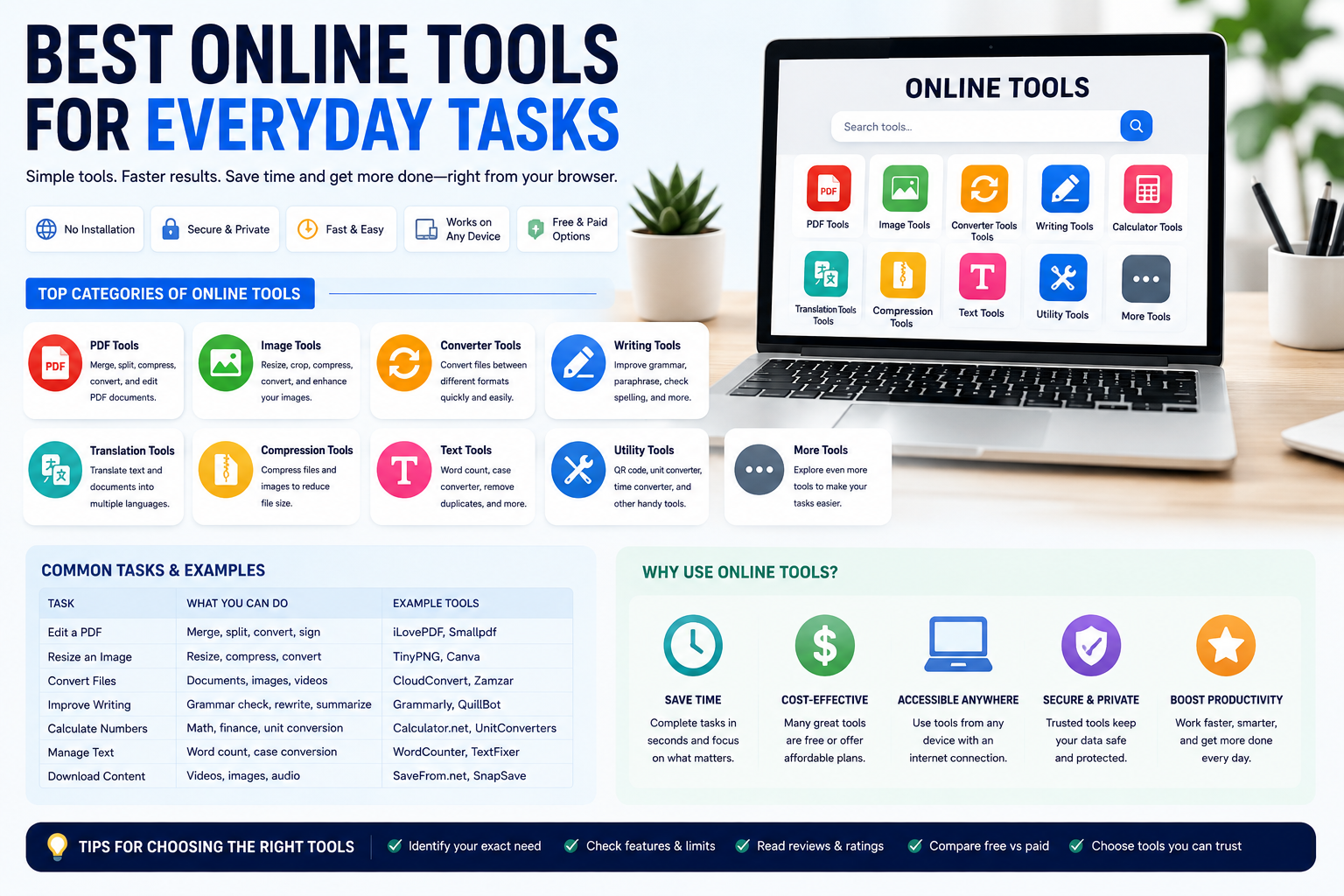
Discover the best online tools for everyday tasks, including PDF editing, image resizing, file conversion, writing, calculations, and productivity.
Best Online Tools for Everyday Tasks
In today's digital world, people perform dozens of online tasks every day. From editing documents and resizing images to converting files and calculating numbers, many activities can now be completed directly through a web browser. Instead of installing specialized software for every task, users can take advantage of online tools that provide quick and convenient solutions.
Online tools are useful for students, professionals, entrepreneurs, freelancers, content creators, website owners, and ordinary internet users. Many platforms offer free versions, while others provide premium features for people who need more advanced functionality.
The main advantage of web-based tools is convenience. Users can access them from almost any device with an internet connection. This makes it easier to complete tasks at home, in the office, or while traveling.
This article explores some of the best categories of online tools for everyday tasks and explains how they can make digital work faster and easier.
Why Use Online Tools?
Online tools have several advantages compared with traditional desktop software.
The first advantage is accessibility. Most web tools work directly in a browser, meaning users do not need to install complicated applications. This can be especially useful when working from a computer that does not have the required software.
Another advantage is speed. Many online tools are designed to complete specific tasks with only a few clicks. A file can be converted, an image resized, or a PDF compressed within minutes.
Cost is another important benefit. Many online services provide free versions for basic tasks. This makes them attractive to students, freelancers, and small businesses that want to control software expenses.
Online tools can also be updated automatically. Users generally do not have to download new versions whenever a service introduces improvements.
1. PDF Tools for Document Management
PDF files are among the most commonly used document formats on the internet. Businesses use PDF files for contracts, invoices, reports, forms, and presentations, while students frequently use them for assignments and research materials.
Online PDF tools can make document management much easier. Users can merge several PDF files into one document, split large documents into smaller sections, compress files, convert PDFs into other formats, and sometimes add signatures or annotations.
PDF compression is particularly useful when a document is too large to send through email or upload to a website. Reducing the file size can make sharing much faster while maintaining acceptable document quality.
Online PDF converters are also useful when users need to edit information contained in a PDF. A document can sometimes be converted into Word or another editable format, allowing the user to make changes more easily.
However, privacy should always be considered when using online PDF services. Sensitive documents containing financial, personal, or business information should only be uploaded to services that users trust.
2. Image Editing and Resizing Tools
Images are essential for websites, social media, online stores, presentations, and digital marketing.
Online image tools allow users to perform many common editing tasks without installing professional image-editing software. Users can resize images, crop photographs, compress files, change formats, add text, and sometimes remove backgrounds.
Image resizing is particularly useful for website owners. Large images can consume unnecessary storage and may contribute to slower page loading. Reducing image dimensions and file size can help create a more efficient website.
Content creators can also use online image editors to prepare social media graphics, blog illustrations, thumbnails, banners, and advertisements.
Another useful feature is image format conversion. Users may need to convert JPG images to PNG, PNG to WebP, or another format depending on the purpose of the file.
For everyday image editing, browser-based tools can provide enough functionality without requiring expensive professional software.
3. Online File Conversion Tools
Different devices and applications often use different file formats. As a result, file conversion is a common requirement for internet users.
Online file conversion tools can convert documents, images, audio files, and videos into different formats. For example, users may convert a Word document into PDF, an image into another format, or a video into a more compatible file type.
The main benefit is convenience. Users do not have to search for and install a separate application for every type of conversion.
Before selecting a file converter, users should check the supported formats and maximum file size. Some free services may limit the number of conversions or restrict larger files.
Security is also important. Users should avoid uploading confidential documents to unfamiliar conversion websites.
For occasional file conversion, an online service can be a fast and practical solution.
4. Online Writing Tools
Writing is another everyday activity that can benefit from web-based tools.
Students may use online writing services to check spelling and grammar. Professionals can use them to improve emails, reports, proposals, and business documents. Bloggers and content creators can use writing tools to organize ideas and improve readability.
Modern online writing tools may provide features such as grammar checking, spelling correction, readability analysis, rewriting suggestions, and text organization.
Some platforms also use artificial intelligence to help users brainstorm topics or improve existing content.
However, automated writing suggestions should always be reviewed. A tool may change the meaning of a sentence or recommend wording that does not match the intended audience.
The best approach is to use writing tools as assistants rather than complete replacements for human judgment.
5. Online Calculator Tools
Calculations are part of everyday life. People calculate discounts, percentages, measurements, dates, expenses, and many other numbers.
Online calculators can make these tasks easier.
Basic calculators can handle simple mathematical operations, while specialized calculators can perform financial, percentage, date, unit-conversion, and other calculations.
For example, shoppers can use percentage calculators to determine discounts. Business owners can calculate margins or estimated costs. Students can use mathematical tools to check their work.
Online calculators are especially useful when a user needs a specific calculation but does not want to manually create a formula.
When calculations are important for financial, legal, or professional decisions, users should verify the results rather than relying on a single online calculator.
6. Online Translation Tools
Language barriers can make communication difficult, especially when people work with international customers, websites, or documents.
Online translation tools provide a quick way to translate words, sentences, and sometimes complete documents.
They can be useful for travelers, students, business owners, and people communicating with international audiences.
However, automated translation is not always perfect. Context, cultural expressions, technical terminology, and complex sentences can sometimes produce inaccurate results.
For simple communication, online translation can be extremely convenient. For legal documents, professional publications, or important business materials, human review may still be necessary.
7. File Compression Tools
Large files can be difficult to upload, email, or store. Online compression tools can reduce file sizes and make them easier to manage.
Image compression is particularly popular among website owners. Smaller images can help reduce bandwidth usage and improve page performance.
PDF compression can also make documents easier to share.
Some online services support multiple types of files, while others specialize in specific formats.
When compressing files, users should check the resulting quality. Excessive compression may reduce image clarity or affect document readability.
A good compression tool provides a balance between smaller file sizes and acceptable quality.
8. Text and Utility Tools
Simple text tools can save time when working with large amounts of information.
Online text utilities can count words and characters, change text capitalization, remove extra spaces, sort lines, identify duplicate content, or format text.
These tools are useful for writers, students, developers, marketers, and website owners.
For example, a content creator may need to check the length of a title or description. A developer may need to quickly format or manipulate text data.
Utility tools are often simple, but their usefulness should not be underestimated. A small tool that solves a repetitive problem can save significant time over the course of a week or month.
9. Online Developer Tools
Developers and website administrators can also benefit from online tools.
Web-based developer utilities can help users format code, test websites, validate HTML and CSS, inspect data, convert formats, and troubleshoot technical issues.
These tools are particularly useful when a developer needs to perform a quick test without installing additional software.
For example, a developer may need to validate a piece of code or format a data file before using it in a project.
Security should be considered when using online developer tools. Private source code, passwords, API keys, and confidential business information should not be entered into untrusted websites.
10. Online Security Tools
Internet security is becoming increasingly important as more personal and business activities move online.
Security-related web tools can help users evaluate passwords, check suspicious links, identify potential security problems, and learn about safer browsing practices.
However, online security cannot depend on tools alone.
Users should also enable multi-factor authentication, use unique passwords, keep applications updated, and avoid suspicious websites and email attachments.
Security tools should support good digital habits rather than replace them.
How to Choose the Right Online Tool
With thousands of online services available, choosing the right tool can sometimes be difficult.
Start by identifying the exact task you need to complete. There is no reason to choose an advanced platform if a simple tool can solve the problem.
Next, check usability. A tool should have a clear interface and straightforward instructions.
Pricing is another consideration. Free tools can be excellent for occasional use, but frequent users may benefit from premium plans.
Privacy is particularly important when uploading files or entering information. Always review the service's privacy policy before submitting sensitive data.
Finally, consider reliability. A useful online tool should provide consistent results and work properly across the devices you use.
Free Tools vs. Premium Tools
Many online services offer both free and premium plans.
Free plans are often sufficient for simple tasks. They are ideal for students, casual users, and people who only need a service occasionally.
Premium plans may provide larger file limits, faster processing, additional features, fewer advertisements, or access to advanced functions.
The right option depends on individual requirements.
Users should avoid paying for features they will never use. At the same time, a premium subscription can be worthwhile if a tool is used regularly and significantly improves productivity.
Benefits for Students
Students can use online tools for research, writing, calculations, document management, presentations, and file conversion.
For example, a student can resize an image for a presentation, convert a document into PDF, check the length of an assignment, or organize text using online utilities.
Because many services are free, students can access useful digital resources without purchasing expensive software.
However, students should use these tools responsibly and understand the information they submit to third-party platforms.
Benefits for Professionals and Businesses
Professionals can use online tools to reduce repetitive tasks and improve efficiency.
Businesses can use web services for document management, marketing, communication, image editing, data processing, and productivity.
Small businesses can especially benefit because web tools may reduce the need for expensive software installations.
Remote teams can also use browser-based platforms to collaborate across different locations.
The key is to choose tools that directly support business objectives rather than adding unnecessary complexity.
Conclusion
Online tools have become valuable resources for everyday digital tasks. Whether you need to edit a PDF, resize an image, convert a file, check your writing, calculate numbers, compress documents, or manage text, there is likely a web-based solution available.
The biggest advantages are convenience, accessibility, speed, and affordability. Users can often complete tasks directly from a browser without installing specialized software.
However, choosing the right tool requires careful consideration. Users should compare features, pricing, reliability, privacy, and security before uploading files or using an unfamiliar service.
A small collection of trusted online tools can make everyday digital work significantly easier. Instead of searching for a new solution every time a problem appears, users can build their own personal toolkit of reliable services.
For students, professionals, entrepreneurs, and content creators, learning how to use the right web tools can save time and improve productivity. In an increasingly digital world, these simple online resources can become an important part of an efficient daily workflow.